

May 25, 2010
labs: RenderQ. . .

Remember all those render droplet apps I was always going on about? Forget about them. I haven’t told any of them yet, but their services are no longer required. Each app performed it’s job perfectly well, but I am all about teamwork here, and there is no “Q” in team. . .
Which has nothing to do with RenderQ, the latest update to the render droplet apps; which not only combines the functionality of MayaRender, AERender, NukeRender, and all of their Q counterparts, it does them all one better by using a little bit of intelligence. RenderQ is a drag and drop render queue app that will send Maya, After Effects, Nuke, C4D, and Shake renders to Terminal and queue them up for easy and efficient local rendering. It is now very easy to set preferences for the version of each app you are using, as well as enabling and disabling additional flags for each filetype. RenderQ will also automatically detect the filetype and submit the job accordingly.
Also included is RenderQ maitre d’ to pause and resume renders and will also show which render engine is currently active and the last job submitted to the queue.
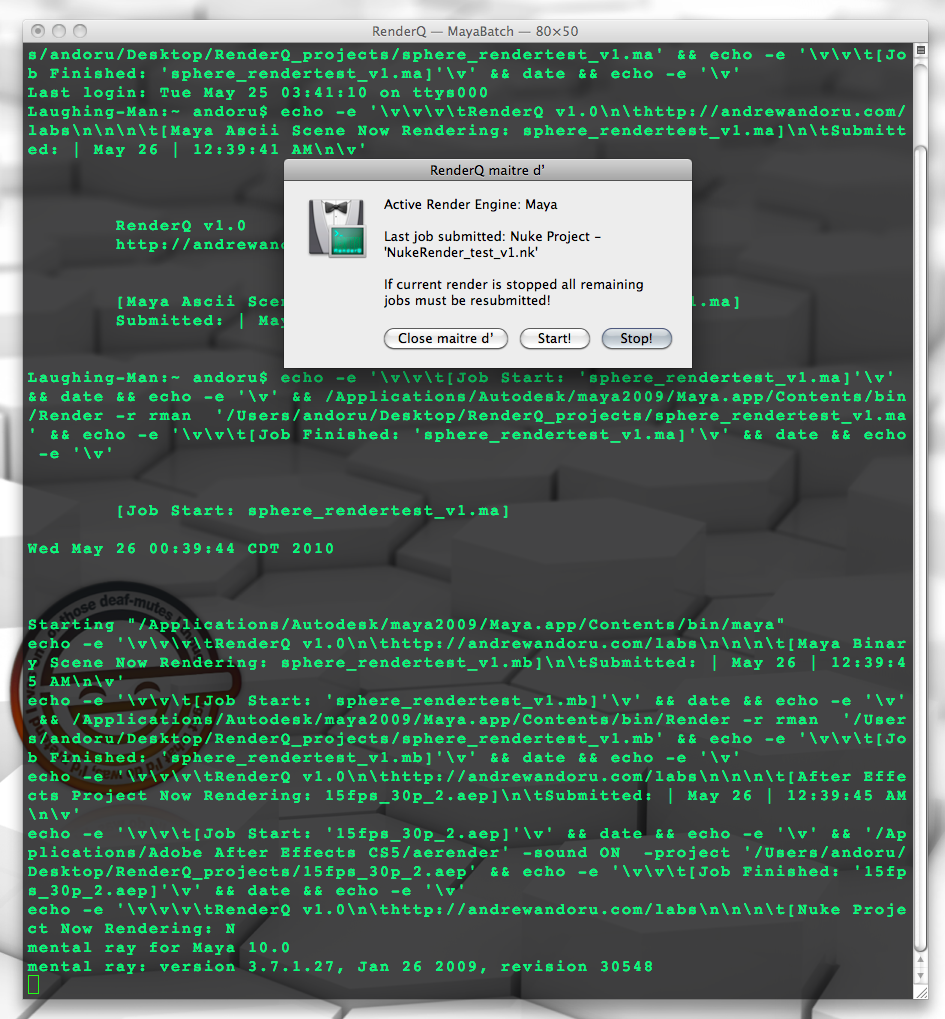
Demo:
 QuickTime Version 1280×800 (92MB)
 iPhone Version
Support for more apps could very well be coming in the future. A $0-25 donation is customary. I prefer to keep this sort of thing on the honor system rather than setting up some sort of direct cost. If you use this tool at a facility I suppose a site license will cost you $0-$1000.
Download: RenderQ download page…
Enjoy! If there are any issues or concerns please contact: andoruLABS.support. One thing I didn’t mention in the demo is that there is also a simple app included to reset the RenderQ preferences. It is quite possible there could be a few little bugs or improvements that could be made so don’t be afraid to contact me. Also, this app is free but feel free to donate, as many hours of work were put into it.

[…] I recently got an email from Greg D suggesting a post on the lab experiments Andrew Andoru has been working on – Thanks Greg, what a great idea! If you remember Andrew had some droplets that would render from After Effects, Nuke and Maya easily – basically doing a terminal render with some automation and without going to the terminal. Â He has also created some apps that will allow you to run multiple instances of applications such as After Effects and Maya – again easily without the use of the terminal. Now Andrew is creating a drag and drop render queue for OS X which you can find and download here. […]
Sounds interesting. Is this a more efficient way to render? Does this speed up the rendering process by not having AE running? Have you done comparisons?
You won’t get results that are dramatically faster but it is the workflow that saves a lot of time really. By not having to load up the GUI of the application into memory you also get some clear advantages especially if you want to render in the background while continuing to work on something else.
If you check out the AERender post there are some people that posted in the comments on GUI rendering vs. command line rendering.
The biggest advantage really though is having one place and one workflow to actually fire off your specific renders.
You Sir, are amazing. Thank you so much for this! You have made life 1000x easier.
Good to hear. Glad it is useful!
This is awesome! I gave it a try last night and it’s so nice to have an easy way to render without getting dirty with the command line. Any chance of getting some sort of email notification a job is complete? Great job!
hi
really great tool but the primary problem is that a little unstable. when you submit more than 3 files, that don’t render all everytime. without apparent reason. when you submit again the same files, that work well (or not)
i think it’s the most important thing to fix,
really great tools thanks for sharing !
hmm. I haven’t had issues submitting more than three files from what I have tested…
strange… mbp with osx 10.5 and nuke 6.06. i have a terminal echo “job finished” but all files wasn’t render
I have found this happens when I leave RenderQ on all day and just keep adding to it when I need (i mean not closing the terminal ever). All I have to do is close terminal and start up RenderQ and it works again.
Not sure how many renders or time it takes before this happens but I will update you if I notice anything
thanks
n
Hmm, not sure. Will keep you posted if I find a fix.
Hey Andrew, great work! I love your apps!
One question about this latest RenderQ instalment; is it possible to run several instances of it to maximise all CPUs? I tried but it didn’t respond the same way as the straight AErender app.
… or is AE cs5 supposed to take care of this itself?
Thanks again!
cheers./david
using an -mp flag with aerender should utilize ae’s multi-processor settings.
I’ve just tried the AERender for CS5.. i went from aprox. 6 seconds per. frame, to 2 seconds per. frame! Thanks a bunch!
Thank the Adobe people for providing different methods of rendering. Thank me for the drag and drop ease of use 😉 Good stuff.
[…] they will add command line functionality to their app so I can incorporate 5DtoRGB encoding into my RenderQ app and have a single simple solution for all heavy duty processing I do on my workstation. In the […]
[…] they will add command line functionality to their app so I can incorporate 5DtoRGB encoding into my RenderQ app and have a single simple solution for all heavy duty processing I do on my workstation. In the […]
Will be adding Cinema 4D rendering to the app soon.
CINEMA 4D support added in RenderQ_v1.1! For all the motion designers out there.
Nice touch to put it all into one app.
What do I do if I have a mixture of AE CS4 and CS5 projects ?
You can get the separate AERender apps (the non Q versions) and they will open up a new terminal window when a project file is dropped on them.
CS5 should be able to render CS4 projects just fine though, plugins and whatnot permitting.
Thanks for adding C4D support!
[…] in After effects Making DVD menus with Adobe Encore What other software? Trent: AERenderQ CS5 - andrewandoru.com/​2010/​05/​25/​labs-renderq/​ Share and […]
Hey Andrew,
When i use render Q, i’m not 100% sure on where the cinema4d executable is, it shows the app as a folder, so i go into the macos folder and select the app in there. i think that might be wrong..
but also, every time i drag on to the icon, it just says “can’t make Class Ctnr of item 1 {alias “points to my C4D file} into type text”
I’m very confused 🙁
I need to know… what’s the little 8-bit sound from? It’s been driving me nuts – I know that I know it somehow!
8bit sound is just something I cooked up. Took a couple of iterations before I found the right amount of happiness. Could be similar to something else out there though. Not sure about that.
Well, we all love it! Huh, could’ve sworn it was from something… !
Tell everyone it was from my brain to my fingers to your ears! I still can’t believe I haven’t got any comments on the going to sleep sound. . .
BTW, I need to do more custom sounds, all I every use is 8bit, let me know if anyone has any requests.